
CEM BANK - Weekly tasks on Monday: Difference between revisions
From Catglobe Wiki
More actions
No edit summary |
|||
| Line 34: | Line 34: | ||
[[Image:CEM-BANK-Notes.jpg]] | [[Image:CEM-BANK-Notes.jpg]] | ||
=== Step | === Step 4 - Update diagram shown in monitor site === | ||
*Path in Monitor: <br>[[Image:Forventninger.png]] | *Path in Monitor: <br>[[Image:Forventninger.png]] | ||
Revision as of 01:29, 24 February 2010
Introduction
There are several steps that needs to be done each Monday morning (Danish time) to ensure that data collected in the previous week is used correctly in the reporting monitor, and that the information text on the My Portal is correct.
Weekly steps
Step 1 - Add week to axis set (Automated)
Add the last week to the data cache axis set. The reason that this needs to be done is that the user will use this axis in the cross tabulation.
- Data cache: 8386cat - CEM Bank Intelligence
- Axis: - - Uge
- Add an extra option that refers to the last week’s week number (name and value).

Step 2 - Change time frame and rebuild data cache (Automated)
- Change the end date in the time frame so the DCS only includes data collected before Monday in the current week, which means 23:59:59 on Sunday (DK time)
- Save and rebuild the DCS

Step 3 - Modify information text
Modify the text in the information box that is shown to the user on the My Portal-page.
- My Portal element: CEM Bank Intelligence - Note
- Navigate to the tab Detailed description (default) and enter the total number of interviews collected in the third line.
- Change the date on the forth line so it refers to the same date that you defined as end date in the DCS time frame (date of last Sunday). These are the Danish month abbreviations that you will need throughout the year: jan, feb, mar, apr, maj, jun, jul, aug, sep, okt, nov, dec

Step 4 - Update diagram shown in monitor site
- Path in Monitor:


- Diagram: 8386cat - Årsager til valg af bank, Forventninger (bars)
Steps:
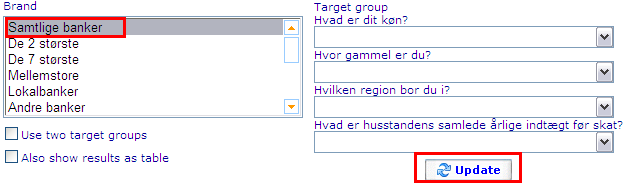
- View the diagram with Samtlige banker checked
- Note the percentages shown in the diagram, sort them in descending order
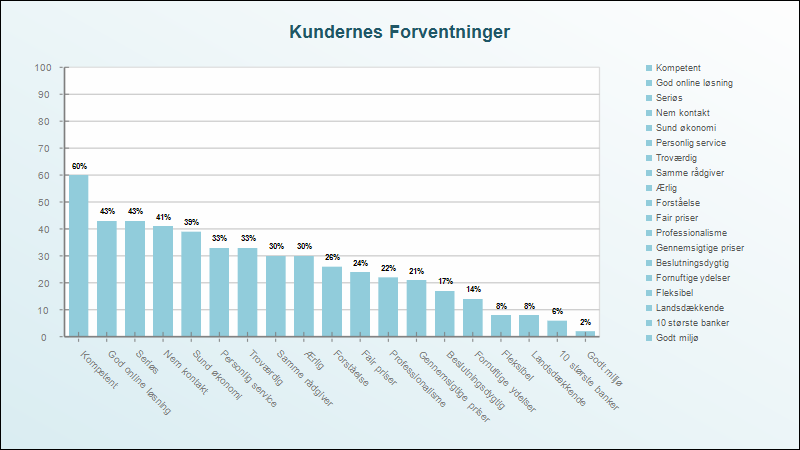
- Sort the brands in the previous order (Tips: use export/import feature to save time)


